Everything you need to subtitle and translate live: from your first session to the summary, rewinding and the report afterwards. Each button in the app is explained below.
Open the app, enter your email address and then your name. You get an email with a sign-in link: it works once and stays valid for 24 hours. After that you stay signed in on that device for 30 days. New here? You get €3 of free credit.
On the left, pick the language being spoken; on the right, the language you want to read. ⇄ swaps them, handy in a two-way conversation. Pick No translation on the right if you only want a written record of what is said, for example to take minutes.
Allow the microphone when your browser asks. Put the device close to the speaker, or connect it to the room's microphone. The subtitles appear straight away: first phrase by phrase, then the best translation once the sentence is finished.
Tap 📡 Share, then Start sharing. You get a six-character code. Send the link with Copy link or WhatsApp, or put the code on the screen in the room. Sharing costs nothing extra, however many people follow.
Followers open the link on their own phone, or open the app and type the code under Following someone?. They need no account and no app. If the listening device sends a voice, they switch it on themselves with 🔇 Voice, ideally with earphones.
On a phone you first see only the main buttons. Tap ☰ to show the others.
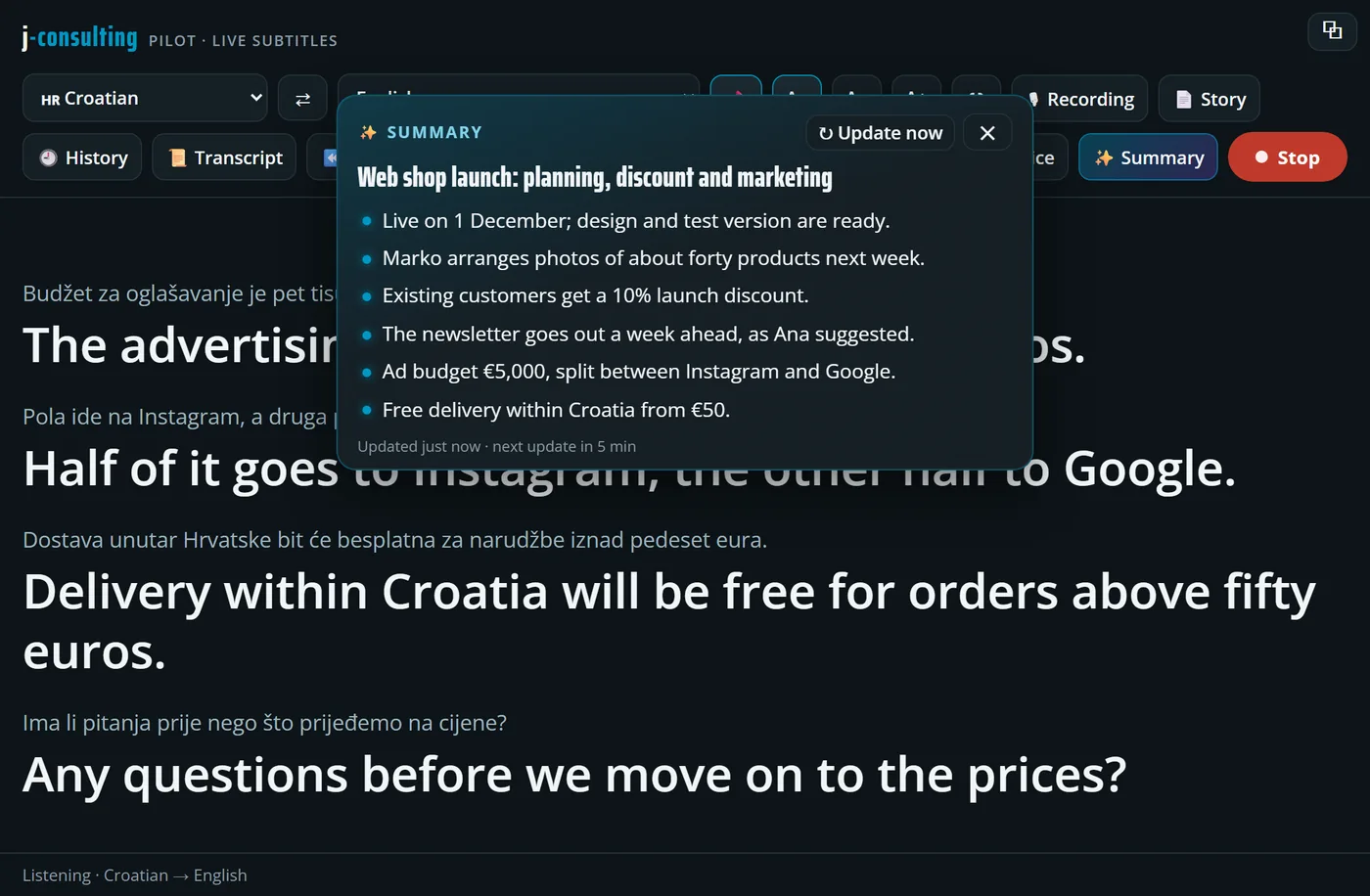
While people talk, AI keeps track of the topic and the key points, in the language you read. Updated every five minutes, and everyone following sees the same summary. Stepped out for a moment? One look and you’re back on track.
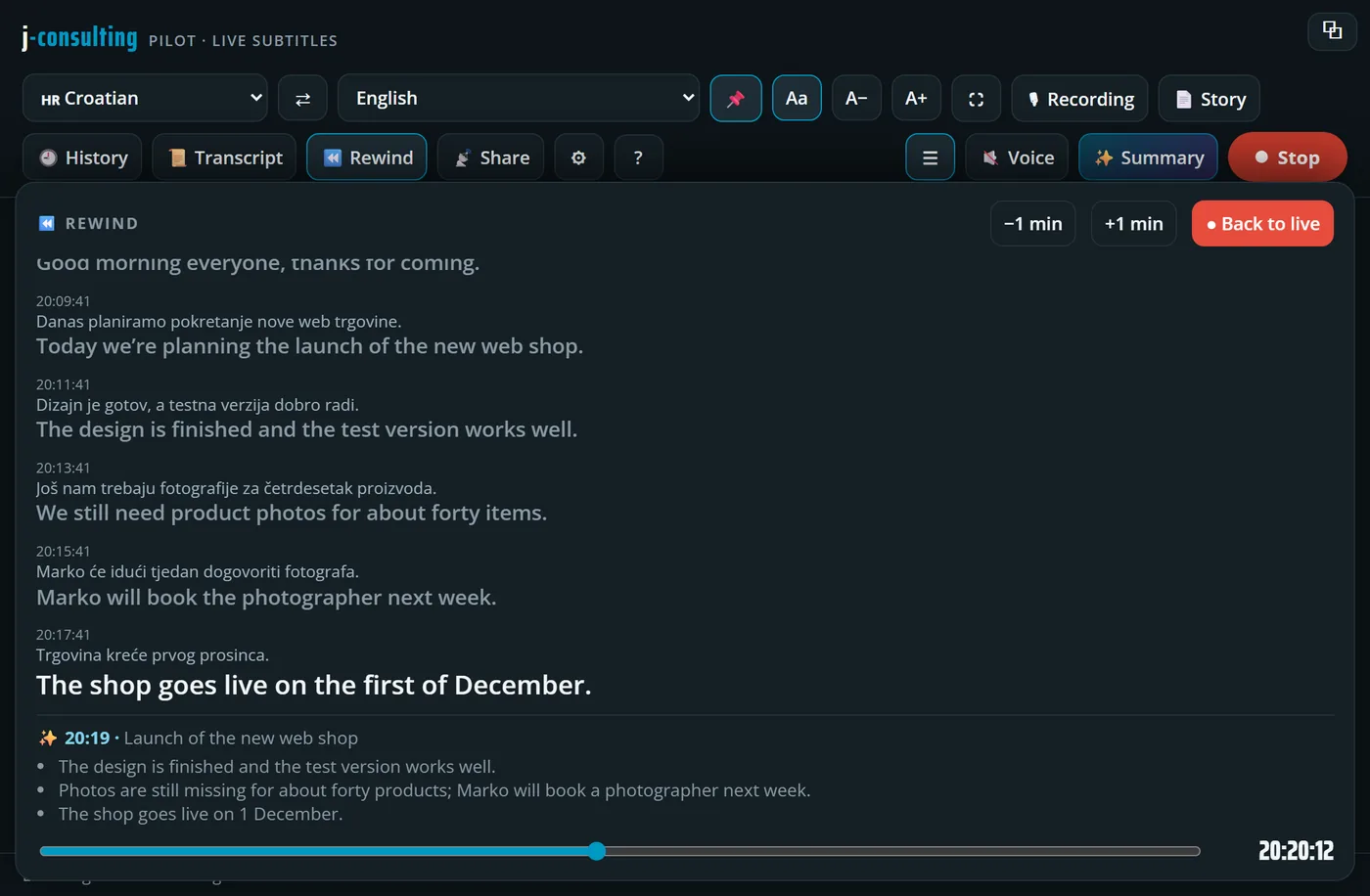
Drag the slider to the moment you missed: you read what was said then, original and translation, with the summary from that moment. Meanwhile the session simply carries on, and one tap brings you back live.
AI summary. The topic and the key points so far. The first one comes by itself shortly after you start, then a new one every five minutes while people speak. ↻ Update now makes one straight away. Followers get the summary from the listening device.
Rewind. Drag the slider back through the running session and read what was said at that moment, with the summary from then. −1 min and +1 min jump a minute; the buttons at the bottom jump to key moments. ● Back to live takes you back. The session keeps running in the meantime.
Floating window. The subtitles in a small window that stays on top of your other programs, for example during a video call. On a phone, press it before you switch to another app. The window can show the summary too.
Read aloud. Each finished sentence is read aloud. On the listening device you choose the voice under ⚙; followers switch it on or off on their own phone.
Share or follow. On the left you start sharing your own session; on the right you enter someone else's code to follow theirs.
Start and Stop. Starts or stops listening. After a stop you can carry on with the same session.
Shows or hides the original text under the translation. Handy if you are learning the language.
Smaller or larger text, for example for a screen in the room.
Full screen.
Hides or shows the buttons, for more room for the text.
Keeps the language choice visible when the buttons are hidden.
Clears the screen. The session stays saved in History.
The whole session to read back, with times. With ✨ AI-proofread, AI removes the speech-recognition slips; while the window is open, new sentences are proofread too. 📋 Copy copies everything.
The whole session as one flowing text. Save it as a PDF (⬇ Save PDF), send it via WhatsApp or copy the text.
Your previous sessions, kept on this device, even after you close the page. Sessions you followed end up here too. The oldest ones disappear automatically.
Downloads the audio recording of the session. Recording works on a computer and is switched on or off under ⚙. The recording stays on your own device.
One line per term. source = target fixes the translation of a name or term; wrong → right corrects a word that keeps coming out wrong in the translation.
Choose a voice and hear it with ▶ Try, set the speed, and choose whether it plays on this device and/or goes to followers. On the listening device always use earphones, or the microphone hears the voice.
Choose whether the audio is recorded while listening (computer only). The recording stays on your device until you download it.
Shows which address you are signed in with and how much credit you have left. Top up adds credit, Sign out signs you out.
Leave these on Automatic: the app picks what works best on your device. Context and End of a sentence after are for advanced users.
Something wrong? Send diagnostics sends us your device's event log, without audio and without subtitles, so we can look into it.
You start with €3 of free credit, valid for 7 days. Subtitles cost €1.49 per hour, the read-aloud voice €4.99 per hour of sound. The AI summary, proofread transcript, rewind and sharing are included, and followers pay nothing. Your credit is shown under ⚙. When it runs out, the app opens the top-up screen by itself: from €10 by Bancontact, card or iDEAL, with a bonus of +10% from €25, +15% from €50 and +20% from €100. Topped-up credit stays valid for 12 months.
Check that the browser may use the microphone: click the padlock left of the address and set the microphone to allow. Also check there that the right microphone is selected. Then reload the page and press Start again.
A link works once and for 24 hours. Just request a new one in the app with your email address. Nothing received? Check your spam folder.
The listening device has to be listening and sharing. At the bottom of the followers' screen it says which session they follow, and whether the listening device is still sending text or has paused. Also check they used the right code.
The microphone hears the read-aloud voice and translates it again. Use earphones on the listening device, or switch off Play the voice on this device under ⚙.
The app then opens the Top up credit screen by itself. Choose an amount and pay via Mollie; your credit is added straight away. Need an invoice or a price for your organisation? Email us.
Press Send diagnostics under ⚙ and email us at info@j-consulting.be with what happened. We'll look into it as soon as we can.