j-consulting
New · €3 free credit
Live subtitles & translation

Follow every meeting in your language

A seminar in Croatian, a meeting in German, a doctor’s appointment in English? With Live Subtitles one device listens and everyone reads the translation live on their own phone, sentence by sentence. No app, no interpreter, no hassle.

14 languages. recognised and translated
1 device. listens for everyone
0 apps. follow along in the browser
€1.49. per hour, no subscription
How it works

One device listens. Everyone follows.

01

One device listens

A laptop or phone near the speaker, or connected to the room’s microphone. Pick the spoken language and the language you want to read, then press Start.

02

Share the code

Tap Share to get a six-character code and a link. Send the link around or put the code up on the screen in the room.

03

Everyone follows along

Followers open the link on their own phone, no app or account needed. Subtitles appear live, and anyone who likes can listen to the translation read aloud through earphones.

Good to know: everyone sees the translation in the same language, chosen on the listening device. Several languages at once in one room? Ask us about a setup with several devices.

Read the full guide →

Who it’s for

Wherever you don’t (fully) understand the language.

🏢 Meetings

International teams, a board with a partner who speaks another language, talks with suppliers: everyone keeps up, without an interpreter.

📝 Meeting minutes

Choose ‘No translation’ and the app writes down everything that is said, in the language of the meeting. The AI summary keeps track of the key points, and afterwards you have the full proofread transcript, or the whole meeting as a PDF.

🎤 Seminars & talks

A speaker in a language you don’t (fully) understand? Read along live and don’t miss a single point. Distracted for a moment? Rewind or check the summary. Afterwards you have the full report.

💬 Live conversations

At the doctor’s, the town hall, on holiday or at a parent-teacher meeting: put the phone between you and switch languages with one tap.

📚 Learning a language

See what is said and the translation together on your screen. A faster way to pick up a language, in real conversations, classes and talks.

Features

More than subtitles.

⚡

Live, sentence by sentence

Hardly any delay: subtitles appear while people speak, first phrase by phrase and, once the sentence is finished, the best translation. Easy to follow, even if you barely understand the language.

🔊

Translation read aloud

A natural voice reads every sentence aloud, for everyone at once. It follows a few seconds behind the speaker: ideal for talks and presentations.

📖

Your own glossary

Names, technical terms and fixed expressions are always spelled and translated correctly.

✨

Live AI summary

Lost the thread, or came in late? The summary shows the topic and the key points so far, and updates itself every five minutes. Followers see it too.

⏪

Rewind

Missed something? Drag back through the running session and read what was said, with the summary from that moment. One tap and you’re live again.

📄

A proofread report

The full transcript, proofread by AI so the speech-recognition slips are gone. Or the whole session as one flowing text, as a PDF or via WhatsApp.

🪟

Floating window

The subtitles stay on top of your other programs, even during a video call or a presentation. On your phone, in a small window over your other apps.

📲

No app needed

Works in the browser on computer, tablet and phone. Followers don’t even need an account: just send them your link from the app.

🔒

Privacy first

No recordings on our server. Shared text is only kept while the session runs and is deleted afterwards. Your past sessions stay on your own device.
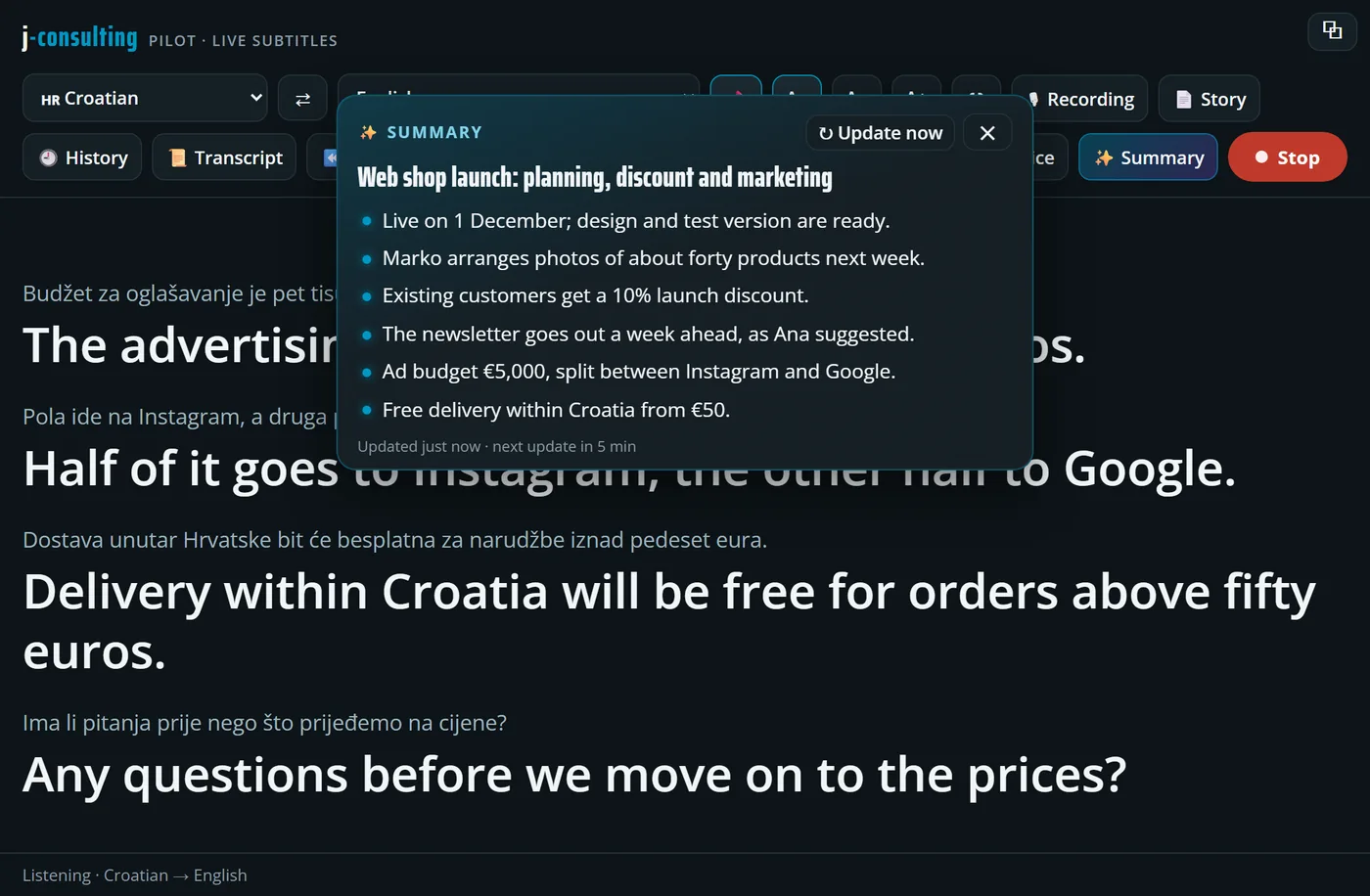
Live Subtitles: AI summary

✨ The summary writes along

While people talk, AI keeps track of the topic and the key points, in the language you read. Updated every five minutes, and everyone following sees the same summary. Stepped out for a moment? One look and you’re back on track.
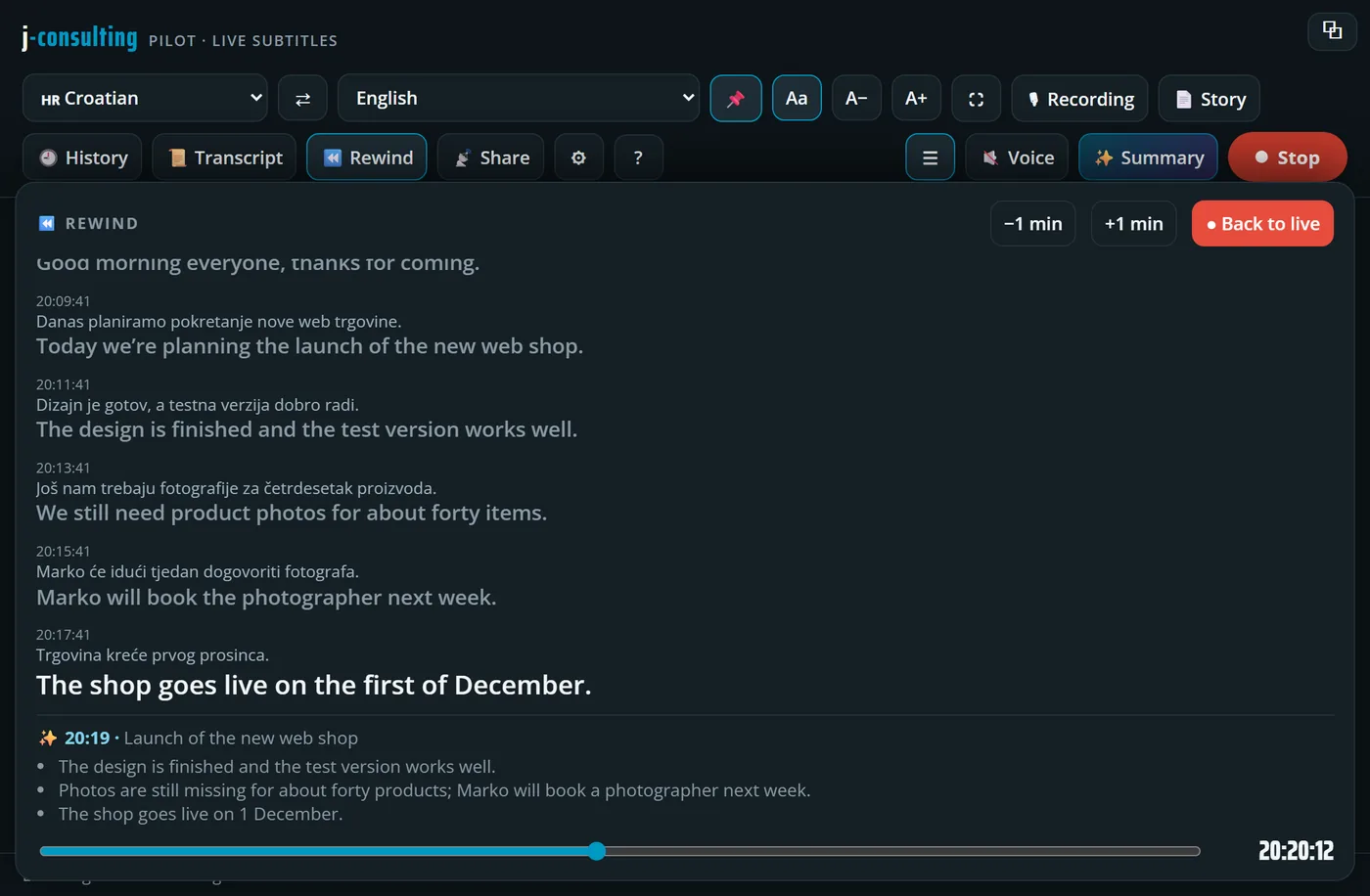
Live Subtitles: rewind

⏪ Rewind while it carries on live

Drag the slider to the moment you missed: you read what was said then, original and translation, with the summary from that moment. Meanwhile the session simply carries on, and one tap brings you back live.

Pricing

No subscription. Pay only for what you use.

Always included

Subtitles

€1.49
per hour · incl. VAT
  • Live recognition and translation, with hardly any delay
  • Share with as many followers as you like
  • AI summary and proofread report included
  • Rewind during the session
  • Your own glossary
Try it for free

Read-aloud voice

€4.99
per hour of voice · optional
  • A natural voice reads the translation aloud
  • One voice for all followers together
  • Follows a few seconds behind the speaker: ideal for talks and presentations
  • You only pay for the seconds of actual speech
Try it for free
How it works: you get €3 of free credit to start (valid for 7 days, good for 2 hours of subtitles). After that you top up yourself from €10 by card, Bancontact or iDEAL, with a bonus: +10% from €25, +15% from €50, +20% from €100. Credit stays valid for 12 months. No subscription, no fixed costs.
FAQ

Good to know.

Which languages are supported?

Live Subtitles recognises Croatian, Serbian, Bosnian, Slovenian, English, German, French, Italian, Spanish, Greek, Arabic, Japanese, Chinese and Dutch, and translates into all of them. Need another language? Just ask us.

How fast does the translation appear?

Subtitles appear almost instantly, while people are speaking, so you can genuinely follow a meeting or conversation live, even if you only understand a little of the language. The read-aloud voice comes a few seconds later, because it waits until a sentence is finished. That is why it works best for talks and presentations, where hearing it to the second does not matter, and less for quick back-and-forth conversations.

Do followers need to install anything?

No. They open the link you share, or type in the six-character code, and follow along straight away. No app and no account.

How good is the translation?

Very good for following a meeting, class or conversation smoothly, also in languages like Croatian that many tools struggle with. It is still machine translation, though: for official or legal matters we recommend a sworn interpreter.

What do I need?

A computer, tablet or phone with internet and a microphone. It works best in Chrome or Edge. The closer the microphone is to the speaker, the better the result. But rest assured: it listens very sensitively, even when the speaker is a little further away.

Can I use it to take meeting minutes?

Yes, it’s ideal for that. Choose No translation on the right: the app then writes down everything in the language being spoken, without translating. During the meeting the AI summary keeps track of the key points, and afterwards you copy the AI-proofread transcript or save the whole meeting as a PDF. So the basis for your minutes is ready as soon as the meeting ends. Meeting in several languages? Then you can translate at the same time.

How much does it cost?

No subscription: you only pay for what you use. Subtitles cost €1.49 per hour, the read-aloud voice €4.99 per hour of voice. You start with €3 of free credit and then top up yourself from €10, with up to 20% bonus. Need a price for your organisation or an invoice? Send us a message.

What happens to what is said?

To create the subtitles, the audio goes to a specialised speech service. We do not keep any recordings. For the summary and the proofreading, the text goes to an AI service, only to produce them. In a shared session the text is only on our server while the session runs. The report and any recording stay on your own device.